DuoDash is distributed through Chariz. If you have already purchased it, these steps will get it running.
Check the compatibility page first. Most installation problems turn out to be an unsupported iOS version or jailbreak. Check compatibility
Installing DuoDash
- Open a supported package manager on your jailbroken iPhone.
- Make sure the Chariz repository is available in your sources.
- Sign in to your Chariz account if you are prompted to.
- Purchase or download DuoDash.
- Install the package.
- Respring if you are asked to.
- Open DuoDash settings and complete the initial configuration.
- Connect to CarPlay.
After installing
DuoDash’s settings live in the iPhone’s own Settings app, under DuoDash — that is where everything below is configured, and where the Respring button sits if a change asks for one. What the first-run setup asks for, any permissions it needs, and what to expect on your first CarPlay connection.
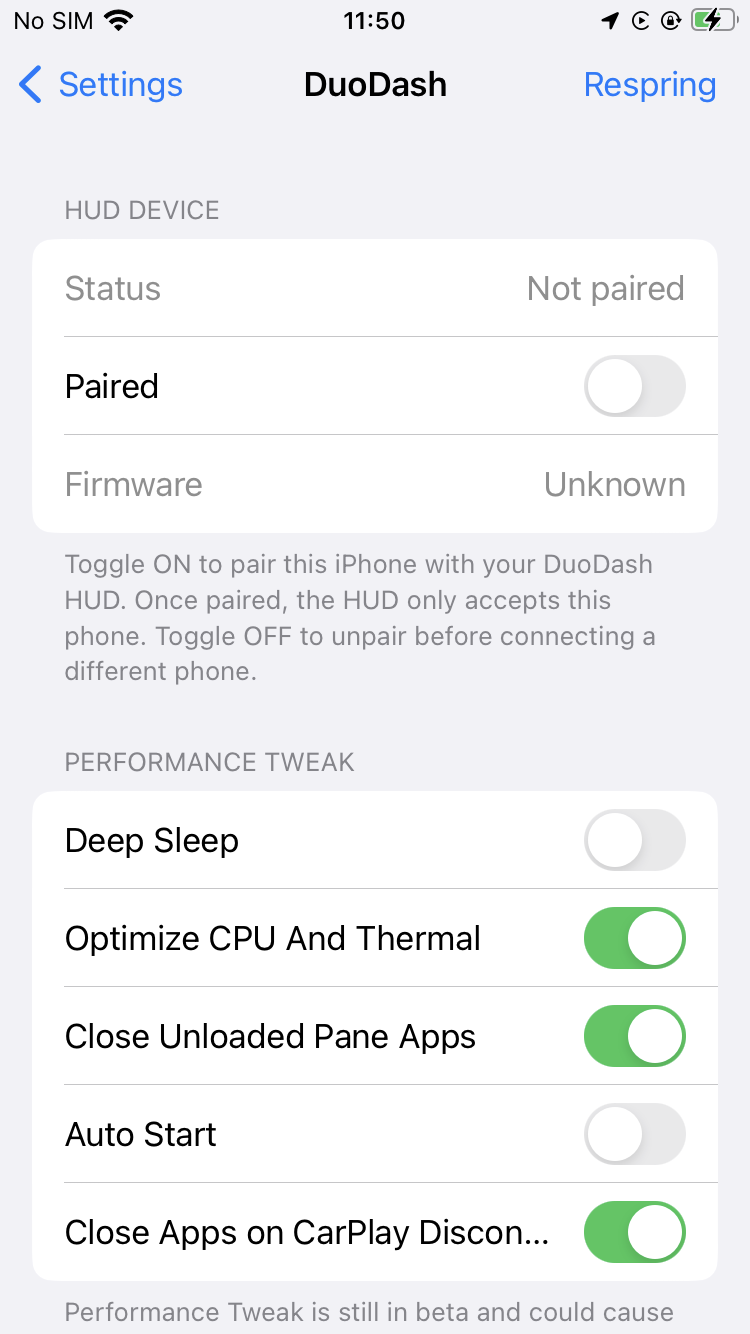
If the phone is going to live in the vehicle
Many DuoDash setups use a dedicated iPhone that stays in the car — wired to vehicle power and installed in the dashboard, the glove compartment or the centre console. If that is what you are building, there is one more setting to turn on before you put the phone away: Deep Sleep. It follows the vehicle’s power, winding the phone down when you switch the vehicle off and restoring the DuoDash environment when power comes back, so the battery is not flat by the time you next drive.
Test it while the phone is still easy to reach. Run several complete cycles — vehicle on, vehicle off, Deep Sleep, wake — and confirm the power source really does go off with the vehicle, before anything is sealed behind a panel. A phone that goes flat and shuts down in there may need its jailbreak restored by hand before DuoDash will run again.
What Deep Sleep does, how long a parked phone lasts, and what to check first
Troubleshooting
If DuoDash is crashing, overheating, lagging badly or freezing the phone, work through this order before anything else. It is arranged so that the cheapest checks come first and the ones that change how DuoDash behaves come last.
- If the phone is frozen, disconnect CarPlay and give it time to recover.
- Respring or restart the phone if it still feels unstable, then test DuoDash again.
- Turn on Close Unloaded Pane Apps.
- Test again.
- Disable the third-party tweaks injected into whichever app is misbehaving, and test the unmodified app.
- Check the video quality Headunit Info recommends, and bring video apps down to it.
- Close apps you are not using.
- If it is still hot or slow, turn on Optimize CPU And Thermal.
- Try to reproduce the problem once more before sending a report.
On an A9 or A10 iPhone, turn the performance and thermal options on from the beginning rather than waiting for a problem to appear. The compatibility page explains which processors that covers.
By symptom
Each topic lists the symptoms, the likely cause, what to try, and what to send support if none of it helps.
The iPhone stops responding entirely
Symptoms
The touchscreen stops responding, the physical buttons appear to do nothing, CarPlay freezes, or DuoDash and the app it is running lock up. Sometimes the whole phone appears frozen.
Possible cause
A crash or conflict somewhere between DuoDash, iOS, CarPlay, the app being bridged and any other tweak you have installed. iOS will usually recover on its own once the affected processes have terminated.
Steps to try
- Disconnect the iPhone from the CarPlay cable or head unit.
- Wait. It can take anywhere from about 30 seconds to several minutes.
- Give iOS time to terminate, recover or restart whatever is stuck.
- Once the phone responds again, close the apps that were involved.
- Respring or restart the phone if it still feels unstable.
- Reconnect to CarPlay only once the phone is back to normal.
Do not keep reconnecting while iOS is still trying to recover. It gives the phone less chance to come back on its own, not more.
What to send support
Use the checklist on the support page so the first reply can be a fix rather than a question. Support
The iPhone gets hot, or DuoDash lags
Symptoms
The phone becomes uncomfortably warm, the car display turns sluggish, or apps stutter during a drive.
Possible cause
DuoDash is being asked to do more than the phone has headroom for. Navigation, video playback, several loaded apps and CarPlay rendering all at once is the heaviest combination there is, and older processors have far less thermal room for it.
Steps to try
- Turn on Optimize CPU And Thermal. It restarts the Home Screen for about 15 seconds, and it does not take effect until CarPlay has been reconnected.
- Turn on Close Unloaded Pane Apps, so an app you swap out of a pane is not left running behind it.
- Close apps you are not actually using.
- Check Headunit Info for the video quality recommended for your display, and set video apps to that or below.
- Check where your iPhone’s processor sits on the compatibility page.
What to send support
Use the checklist on the support page so the first reply can be a fix rather than a question. Support
An app crashes or misbehaves inside DuoDash
Symptoms
One particular app repeatedly crashes when you use it through DuoDash, or makes DuoDash unstable, while everything else behaves.
Possible cause
That app may have its own jailbreak tweaks injected into it — modifying playback, background audio, advertising, the interface, the app lifecycle or its networking. Any of those can conflict with DuoDash, with iOS, with CarPlay, or with each other. A crash that happens inside DuoDash does not by itself mean DuoDash caused it.
Steps to try
- Disable or unload the third-party tweaks injected into that app.
- Run the unmodified app through DuoDash.
- Try to reproduce the problem.
- If it has gone, re-enable the tweaks one at a time until you find the one that conflicts.
SenseTechLab cannot guarantee compatibility with every third-party jailbreak tweak. If you report an app-specific crash, you may be asked to reproduce it with those tweaks disabled before it can be investigated as a DuoDash bug.
What to send support
Use the checklist on the support page so the first reply can be a fix rather than a question. Support
A phone left in the vehicle is flat, or does not wake with it
Symptoms
A dedicated iPhone that lives in the vehicle is dead when you come back to it, or the car display stays empty when you start the vehicle after it has been parked for a while.
Possible cause
Background activity draining the battery while the vehicle was parked. With the screen off, iOS still runs background apps, network and wireless services, location services and system daemons, alongside whatever tweaks are installed — and on a phone that never leaves the car that is enough on its own to flatten it. If the battery did reach zero the phone shut down, and on many jailbreaks that means the jailbreak environment has to be restored before DuoDash will run again.
Steps to try
- Charge the phone, and if it shut down, restore the jailbreak environment the way your jailbreak requires.
- Turn on Deep Sleep. Like the rest of the performance switches, it is off after installation.
- Check the phone is on a power source that is live while the vehicle is running and genuinely off when it is not — that transition is the signal Deep Sleep follows.
- Check the battery’s health. A worn battery gives far shorter standby whatever Deep Sleep does.
- Move the phone if it is installed somewhere that gets excessively hot.
- Run several vehicle on, vehicle off, Deep Sleep, wake cycles while you can still reach the phone.
Deep Sleep reduces battery drain but cannot eliminate it. The 10 days to two weeks it aims for assumes a battery in good condition and a sensible configuration; a phone parked for longer than that, or one with a tired battery, can still go flat.
What to send support
Use the checklist on the support page so the first reply can be a fix rather than a question. Support
DuoDash doesn’t appear
Symptoms
After installing, DuoDash is not visible on the CarPlay screen.
Possible cause
To be completed by SenseTechLab from real support cases.
Steps to try
To be completed.
What to send support
Use the checklist on the support page so the first reply can be a fix rather than a question. Support
Settings page doesn’t load
Symptoms
The DuoDash entry in Settings opens to a blank or spinning screen.
Possible cause
To be completed by SenseTechLab from real support cases.
Steps to try
To be completed.
What to send support
Use the checklist on the support page so the first reply can be a fix rather than a question. Support
CarPlay doesn’t reconnect
Symptoms
CarPlay connects once but will not reconnect on the next drive.
Possible cause
To be completed by SenseTechLab from real support cases.
Steps to try
To be completed.
What to send support
Use the checklist on the support page so the first reply can be a fix rather than a question. Support
DuoDash UI is blank
Symptoms
DuoDash launches but shows an empty dashboard.
Possible cause
To be completed by SenseTechLab from real support cases.
Steps to try
To be completed.
What to send support
Use the checklist on the support page so the first reply can be a fix rather than a question. Support
License or purchase verification issue
Symptoms
DuoDash reports that it cannot verify your purchase.
Possible cause
To be completed by SenseTechLab from real support cases.
Steps to try
To be completed.
What to send support
Use the checklist on the support page so the first reply can be a fix rather than a question. Support
Crash after installation
Symptoms
The device resprings repeatedly, or CarPlay crashes on connect.
Possible cause
To be completed by SenseTechLab from real support cases.
Steps to try
To be completed.
What to send support
Use the checklist on the support page so the first reply can be a fix rather than a question. Support
Wireless CarPlay issue
Symptoms
DuoDash behaves differently over wireless CarPlay than wired.
Possible cause
To be completed by SenseTechLab from real support cases.
Steps to try
To be completed.
What to send support
Use the checklist on the support page so the first reply can be a fix rather than a question. Support
How to collect a crash log
Symptoms
Support will usually ask for one — here is where to find it.
Possible cause
To be completed by SenseTechLab from real support cases.
Steps to try
To be completed.
What to send support
Use the checklist on the support page so the first reply can be a fix rather than a question. Support
How to disable DuoDash temporarily
Symptoms
Useful for isolating whether DuoDash is involved in a problem.
Possible cause
To be completed by SenseTechLab from real support cases.
Steps to try
To be completed.
What to send support
Use the checklist on the support page so the first reply can be a fix rather than a question. Support
How to uninstall DuoDash
Symptoms
Removing DuoDash completely.
Possible cause
To be completed by SenseTechLab from real support cases.
Steps to try
To be completed.
What to send support
Use the checklist on the support page so the first reply can be a fix rather than a question. Support